 THE EMPIRE

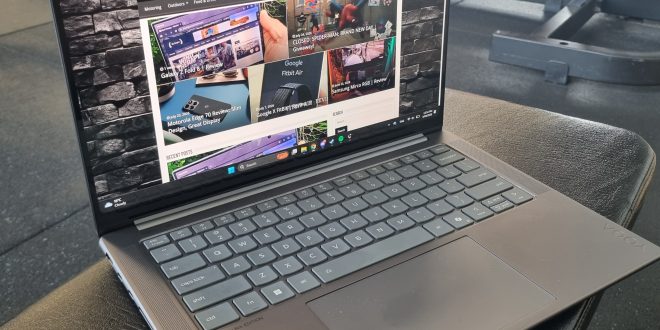
The Lenovo Yoga Pro 7i Aura Edition Gen 10 is a powerful, versatile premium laptop for creators, business users and casual gamers. Its OLED display, touchscreen and performance are genuine strengths, though its glossy panel, fast battery drain at 120 Hz and loud fans under load are compromises worth considering.
Lenovo Yoga Design
External
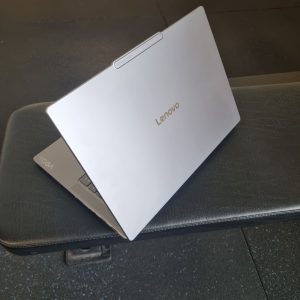
The design of the Lenovo Yoga Pro 7i feels like a premium laptop as soon as you pick it up. It has a clean design, a solid build and a compact form factor for the amount of performance packed inside it.
There are a few small design choices that I did not love, though.
The power button is on the side of the laptop and is very easy to press accidentally. It is not a major issue, but it is one of those things you notice once you have used the laptop for a while. I would have preferred it placed somewhere slightly less exposed.
The webcam also pokes out from the top of the display. It is not a dealbreaker, and it likely helps Lenovo fit in a better camera, but I do think it affects the overall look. It makes the laptop feel slightly less sleek than it could have been and can feel a bit awkward when opening or handling the screen.
These are small complaints, nitpicks, if you will, rather than major flaws. Overall, the Yoga Pro 7i Aura Edition still looks and feels like a premium laptop. It is sturdy, well-made, and practical enough to take between work, home and meetings.
Internal – The good and the bad
CPU: Intel Core Ultra 9 285H – Fast for work, editing and multitasking. Runs hot and can make fans loud.
Integrated Graphics: Intel Arc 140T graphics – Smooth casual gaming; Path of Exile 2, Diablo IV and Conquest Dark ran well. Not built for max-settings AAA gaming.
RAM: 32 GB LPDDR5X RAM – Great for lots of tabs and demanding programs. Soldered and not upgradeable.
Storage: 1 TB PCIe Gen 4 SSD – Fast loading and solid storage capacity. Can fill quickly with large games or video files.
Display: 3K 120 Hz OLED touchscreen – Sharp, smooth and excellent for games and creative work. Glossy, reflective and power-hungry.
Battery: 84 Wh battery – Good capacity for a thin laptop. Drains quickly at 120 Hz or while gaming.
3K OLED Display – INCREDIBLE
The 3K OLED touchscreen is easily the best part of the Lenovo Yoga Pro 7i Aura Edition Gen 10.
The display is sharp, colourful and smooth. Blacks look properly black, colours have a lot of depth and everything from photos to games looks more impressive than it does on a standard laptop panel, hell, even better than most monitors. It makes basic browsing, watching videos and scrolling through documents feel noticeably more premium.
The 120 Hz refresh rate also makes a difference. Scrolling through websites feels smoother, moving windows around looks cleaner, and games feel better when the laptop can take advantage of the higher refresh rate.
For creative work, the OLED display is a major selling point. It suits photo editing, video editing, design work and content creation because it delivers strong colour, contrast and detail. If you spend a lot of time looking at images, editing videos or working with visual content, this is the sort of screen that can make a difference.
However, the glossy finish can be frustrating.
The screen is extremely reflective in bright rooms. If you are sitting near a window, under strong lighting or working in a gym, office or café with lights behind you, you will often see reflections in the display. At times, you can see your own face, the room behind you or overhead lighting more than you would like.
The OLED panel is still fantastic, but it is best enjoyed indoors where you can control the lighting.

Battery Life
This is where things become a slight issue.
The 3K OLED screen looks amazing, but it is power-hungry. Running the display at 120 Hz can drain the battery life insanely fast, especially if you have high brightness, multiple programs open, or you are playing games.
The laptop can still last well enough for general work if you manage the settings properly. Running the screen at 60 Hz, lowering brightness slightly and using it mainly for browser work, documents, spreadsheets and emails will give you a much better result. Though I could run it for a fair while while playing Conquest Dark without the need for the charger.
However, if you want the best display experience all the time, you need to accept that you will need that charger nearby more often than not.
Gaming makes the battery drain even faster. The games look excellent on the 3K OLED screen, but I would not rely on the laptop for long gaming sessions without plugging it in. It performs best when connected to power, especially if you are trying to enjoy the high refresh rate and sharp display without worrying about battery percentage.
Though I could run it for a fair while while playing Conquest Dark @ 60 Hz without the need for the charger.
This is not a laptop I would buy purely for all-day battery life. It is better viewed as a powerful portable machine that can last through normal work, but performs at its best while plugged in.
Gaming performance, better than expected
I tested Path of Exile 2, Diablo IV and Conquest Dark. All three looked excellent on the 3K OLED display and ran smoothly during normal play. The laptop is not trying to replace a proper gaming machine with a high-end dedicated graphics card, but it has enough performance to make it a genuinely enjoyable casual gaming laptop.
Path of Exile 2 was the best showcase for the display. The game already has dark environments, detailed armour, atmospheric lighting and huge amounts of visual effects. On the Yoga Pro 7i’s OLED screen, the particle effects, spell explosions, fire, lightning, darker areas and more looked especially impressive.
When combat became busy and the screen filled with effects, the OLED panel really showed what it could do. Blacks stayed deep, colours stood out, and the contrast made everything look sharper and more dramatic. The higher-resolution screen also helped the game look detailed, particularly in environments with a lot happening on screen.
The game struggled to get to 60 FPS and ran at 54-55 FPS on a performance-based setting, with 24-30 FPS more common on a quality-based setting.
Diablo IV still looked great. Its darker world, fire effects and strong use of shadows suit an OLED display well. However, Path of Exile 2 was the game that made the Lenovo Yoga Pro 7i feel most like a premium entertainment machine rather than just a strong work laptop.
Conquest Dark also ran well and looked great; this is an indie game. The laptop has enough performance to be a solid casual gaming machine, particularly for games that don’t push a high-end dedicated graphics card to its limit.
If you want to play the latest AAA games at ultra settings, high resolutions and high frame rates, you will be better off with a proper gaming laptop with dedicated NVIDIA RTX graphics.
Is that a jet? Nah, just the fans
The laptop can get loud when it is pushed.
During gaming, video editing, exports or heavier workloads, the fans can genuinely sound like you are sitting next to an airplane engine preparing to take off. It is not subtle fan noise in the background. You will absolutely notice it.
The good news is that airflow makes a big difference.
If you lift the back of the laptop slightly off the desk, table or other surface, the fans breathe more easily and calm down. Even a basic laptop stand can help. Once there is space under the laptop for airflow, it becomes noticeably more manageable.
I would recommend a simple laptop stand for regular gaming, video editing or CAD work. It is not essential, but it makes the experience more comfortable and may help the laptop avoid sounding like it is trying to leave the runway.
Touchscreen is a nice touch
The touchscreen is more useful than I expected.
For general browsing and scrolling, it is nice to have but not essential. The real advantage is for business use. I deal with clients who need to sign contracts where a normal e-signature or PDF signature isn’t viable.
Being able to turn the laptop around and have a client sign directly on the touchscreen is genuinely useful. It makes the Lenovo Yoga Pro 7i practical for businesses that deal with waivers, contracts, forms, agreements and client paperwork.
For me, it makes the laptop more than just a powerful work machine. It also becomes a useful in-person business tool. The touchscreen adds another level of convenience when someone needs to sign something in person.
Speakers and Bluetooth
The built-in speakers are surprisingly good and loud, extremely loud.
They have more volume and clarity than I expected from a thin laptop. Music, videos, voice calls and games all sound good enough without immediately needing headphones. The speakers do not feel weak or tinny, which is still a common issue with many laptops. Though once it gets loud enough, at 80% max volume, it starts to vibrate and feels uncomfortable.
I still ended up using Bluetooth earbuds and headsets most of the time. They connected seamlessly and worked without any noticeable issues. That is exactly what you want from Bluetooth: connect it, use it and do not think about it again.
For gaming, video calls and working around other people, I would still use earbuds or a headset. However, the speakers are good enough that you will not feel forced to use them for every movie, video or casual game.
Aura and AI features unnecessary
I was not a major fan of the Aura or AI features.
Lenovo pushes the Aura Edition branding heavily, and the laptop frequently promotes its AI-based features. Some users may find them useful, especially for webcam effects, background blur, automatic framing or battery and performance suggestions.
For me, it became more annoying than helpful. Most of the features it offered were things I’m fully capable of doing myself; I didn’t need them and felt like bloat, so it was more a personal issue.
The laptop is good because it has powerful hardware, a premium screen, solid build quality, useful ports, a touchscreen and good performance. It does not need to keep trying to convince me that it is clever because it has AI features attached to it.
The Aura and AI features feel like an extra layer sitting on top of an already good laptop. They are not the reason to buy it, and I would rather Lenovo let the core hardware speak for itself. Yes, AI is useful; I won’t deny that, and I encourage ethical AI. But not every company needs to push its own AI; it’s starting to feel like every supermarket with its own rewards card. Get out of my face.

Is the Lenovo Yoga Pro 7i Aura Gen 10 worth it?
The Lenovo Yoga Pro 7i Aura Gen 10 is a very capable premium laptop, and the price reflects that, coming in at $5,339.00.
It has a stunning 3K OLED touchscreen, strong performance for work and creative programs, enough power for casual gaming and features that make it useful in a real business environment.
It is particularly well suited to people who need a laptop for:
-
Design and creative work:
- Photo and video editing
- CAD software and demanding productivity programs
-
Business admin, spreadsheets and client management:
- Contracts, forms and touchscreen signatures
-
General home use and media
-
Casual gaming
Premium Power With Trade-Offs
After using the Lenovo Yoga Pro 7i Aura Edition Gen 10 for work, client admin, gaming and general day-to-day use, I would give it an 8/10.
It is a laptop that does a lot very well. The screen looks excellent, it handles demanding programs with ease, and it is versatile enough to work as a business laptop, creator laptop and light gaming machine. However, it also has a few annoyances and a price tag that stop it from being an easy recommendation for everyone.
The main trade-offs are the glossy display, high battery drain under certain conditions, heavy fan noise under load and the unnecessary focus on Aura and AI features.
If you’d like to check out more from us, you can click HERE!!




Latest posts by Hayden Biddick (see all)
- Lenovo Yoga Pro 7i Review | Aura Edition Gen 10 - September 29, 2026
- Motorola Edge 70 Review: Slim Design, Great Display - July 23, 2026
- Motorola Moto G05 & G15 – Reivew - June 22, 2025
- JBL Soundgear Frames | Audio Sunglasses – Review - January 10, 2025